DESK ORGANIZATION BUYING GUIDE
around the computer desk
5 shopping tips to get rid of clutter
Wiring on the floor, cords at hand, plugging and unplugging, a narrow work surface, a laptop occupying the desk. Divide into 5 types of clutter and compare the prices and installation conditions of 3 candidates for each, 15 candidates in total.

This article contains advertising links to Amazon. The operator may receive a referral fee for purchases made through links. Please check the product page for price, stock, and specifications.
01|Shopping to organize wiring
cable box
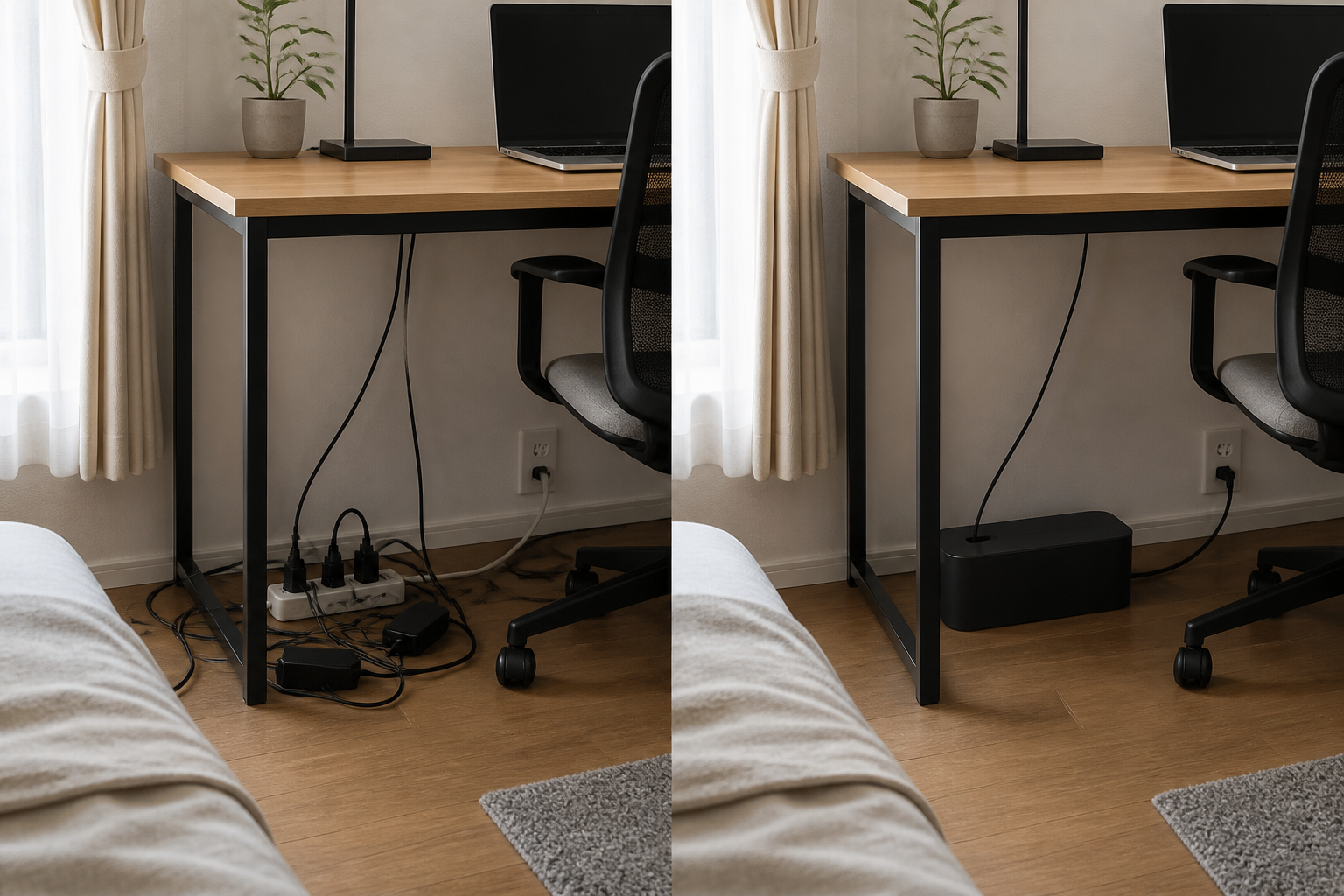
For products that serve the same role, start with this cheapest option.
Before introduction
Power taps, boxes surrounding power supplies, and excess cords are exposed on the floor and ceiling. Every time you clean it, you lift the line, and dust tends to accumulate under your feet.
After introduction
Store power systems that do not move in one place. The mass of lines disappears from your field of vision, and there are fewer things to avoid when wiping the floor or top.
Biggest benefit:Even though the number of wires is the same, the burden of "looking at, avoiding, and cleaning wires" every day can be reduced.
- First choice for price:Checked Amazon.com example: $22.99
- The inner dimensions are announced as W244 x D140 x H115mm, making it easy to measure whether or not it can be stored.
- Equipped with a top hole and cable routes in 3 directions, suitable for storing 4 taps.
Conditions not suitable:The lack of monitor stand legs and laptop sockets will not be resolved. First, measure the actual size of the box around the tap and power supply that you want to store.
When in doubt, choose BUFFALO BSTB01SBK.A 4-port tap that comes in a box can achieve the same purpose of ``hiding the tap and excess cable length'' at the lowest cost. The only reason to upgrade to a more expensive product is if you want to prioritize materials that are less likely to spread flames, or if you need a large capacity of 7 mouths.
Check the D-Line option on Amazon.com — $22.99 →Conditions that make it worth replacing with a more expensive product
The comparison condition is that the power strip and extra cable length can be hidden inside the box and wired from the top or side. Only when the lowest-priced product has a missing feature, choose the top candidate.
| merchandise | Size/Material | Wiring and usability | person for |
|---|---|---|---|
| D-Line Cable Management Box →Amazon.com result: $22.99 USDChecked August 13, 2026. Price and availability can change. Confirm price and availability on Amazon.com before buying. | Width 257 x depth 157 x height 138mm Inside: width 244 x depth 140 x height 115mm Approximately 532g/Resin that does not spread easily | Hole on top and cord exit in 3 directions. Guideline for 4 taps | Same role at the cheapest price.If it fits inside, this is the first one. |
| Large Cable Management Box →Amazon.com result: $20.99 USDChecked August 13, 2026. Price and availability can change. Confirm price and availability on Amazon.com before buying. | Width 230 x depth 140 x height 132mm 563g ABS resin, material with emphasis on resistance to flame spread | Cord exit on top and side. Non-slip top surface, suitable for stacking | Differences: Made of material that prevents the spread of flames, and the installation width is 27mm shorter.When safety and space savings are your priorities |
| Tuwechen Large Cable Management Box →Amazon.com result: $22.30 USDChecked August 13, 2026. Price and availability can change. Confirm price and availability on Amazon.com before buying. | Approximately W400×D155×H145mm Large class with 7 taps | Comes with a lid to keep power strips and extra cables together. Please check the installation surface to ensure width | I want to hide the big tap.For wiring around TVs and multiple devices |
Conclusion:Choose D-Line when its dimensions fit your power strip. Compare larger US-market cable boxes only when you need more capacity; otherwise there is no reason to pay more.
Regarding price display:The above is This is the tax-included display price obtained from Amazon.com search results. Prices vary depending on the seller, stock, shipping address, and sale, so please double check the linked cart screen before purchasing. Further suggestions will not be confirmed as recommended until we can confirm the price and acquisition date.
Specification confirmation:Sanwa Supply Official、BUFFALO official(Verified August 7, 2026). Even if the material is resistant to flame spread, it does not completely prevent heat and fire. Do not bundle the cords into small bundles and regularly check for dust and the condition of the plugs.
02|Shopping to organize your belongings
wireless mouse
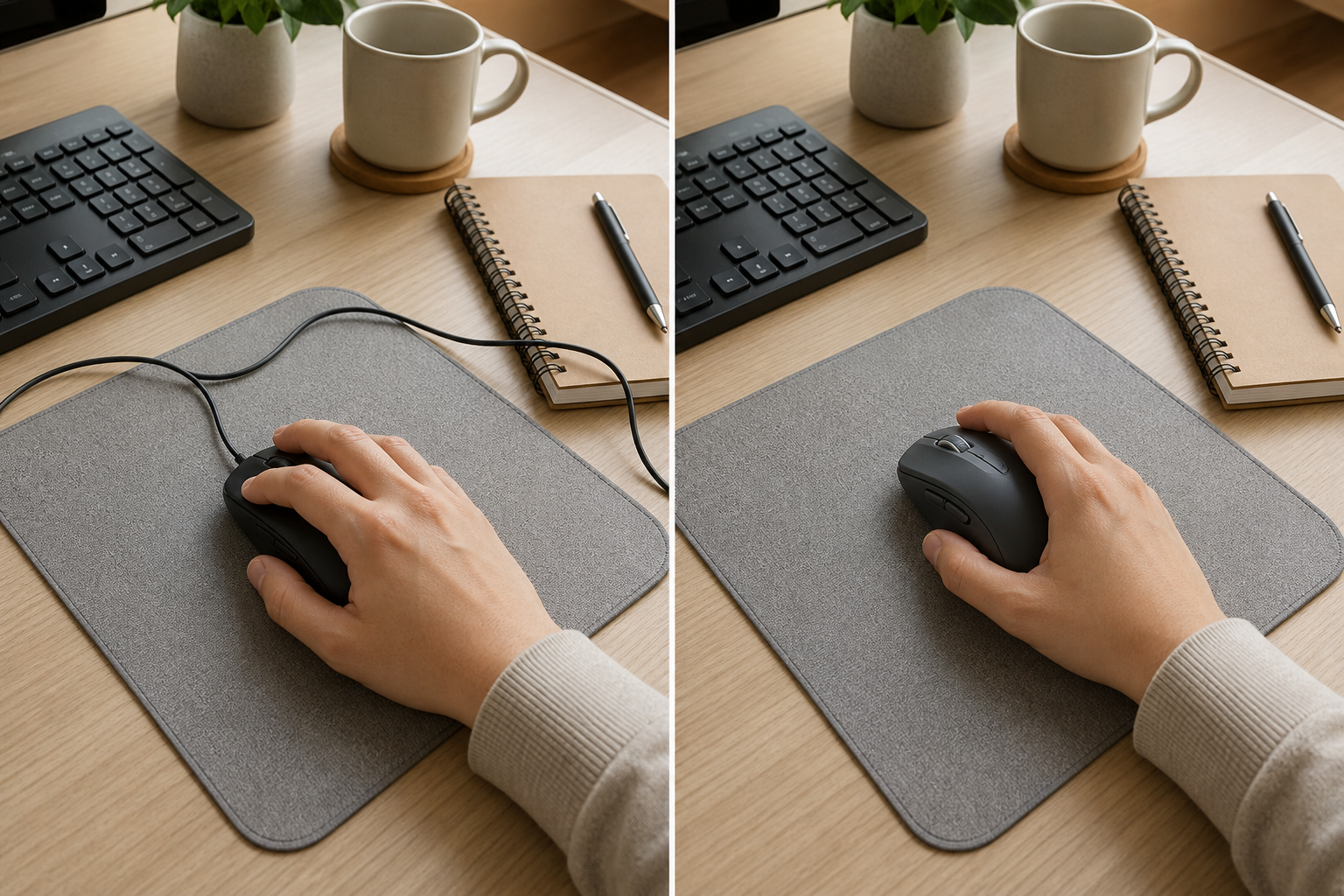
wireless mouse
Before introduction
If you move the mouse too much, the wire will hit things, and on a narrow desk, you'll be drawn back to the cable. Clicking sounds are also annoying during online meetings.
After introduction
Cables disappear from the range of motion, allowing you to freely arrange your hands. Silent clicks and fast scrolling make moving through long documents a breeze.
Biggest benefit:The small snags that used to occur every time you operate it are gone, and your hand movements are less likely to be hindered even on a narrow work surface.
- Connect wirelessly or with the included small receiver
- Check the size according to the size of your left and right hands/hands
- You can shorten the back/forward operation with the button on the side.
Conditions not suitable:If you are already using a wireless mouse with no complaints, the change will be small. Also make sure that it is battery-powered, not rechargeable.
Check on Amazon →Compare with a wireless mouse for the same purpose
| candidate | Power supply/characteristics | Price (date of acquisition) | Conditions to choose |
|---|---|---|---|
| Logitech Signature M650 →Amazon.com result: $29.99 USDChecked August 13, 2026. Price and availability can change. Confirm price and availability on Amazon.com before buying. | Battery operated. There are sizes to suit different hand sizes, and you can also use the buttons on the side. | $29.99 USD Amazon.com result checked August 13, 2026 | It's enough to reduce lines and click sounds.I don't want to increase the hassle of charging |
| Logitech MX Anywhere 3S →Amazon.com result: $89.99 USDChecked August 13, 2026. Price and availability can change. Confirm price and availability on Amazon.com before buying. | Rechargeable. Easy to use even on glass surfaces and allows you to switch between multiple computers | $89.99 USD Amazon.com result checked August 13, 2026 | $89.99 USD Amazon.com result checked August 13, 2026 |
| Logitech Pebble Mouse 2 M350s →Amazon.com result: $24.99 USDChecked August 13, 2026. Price and availability can change. Confirm price and availability on Amazon.com before buying. | Thin and easy to carry. There are no back/forward buttons on the side. | $24.99 USD Amazon.com result checked August 13, 2026 | $24.99 USD Amazon.com result checked August 13, 2026 |
Conclusion:If you just want to reduce the lines and noise on your desk, choose the M650. If you want to use it on a glass surface or with multiple devices, switch to MX Anywhere 3S, and if thinness and portability are your top priorities, switch to Pebble Mouse 2.
Comparison confirmation:Signature M650 official、MX Anywhere 3S official. Price confirmation:MX Anywhere 3S sales page、Pebble Mouse 2 M350s price comparison. Please double check the price, stock, and accessories on the sales page at the time of purchase.
03|Shopping to organize connections
connection hub
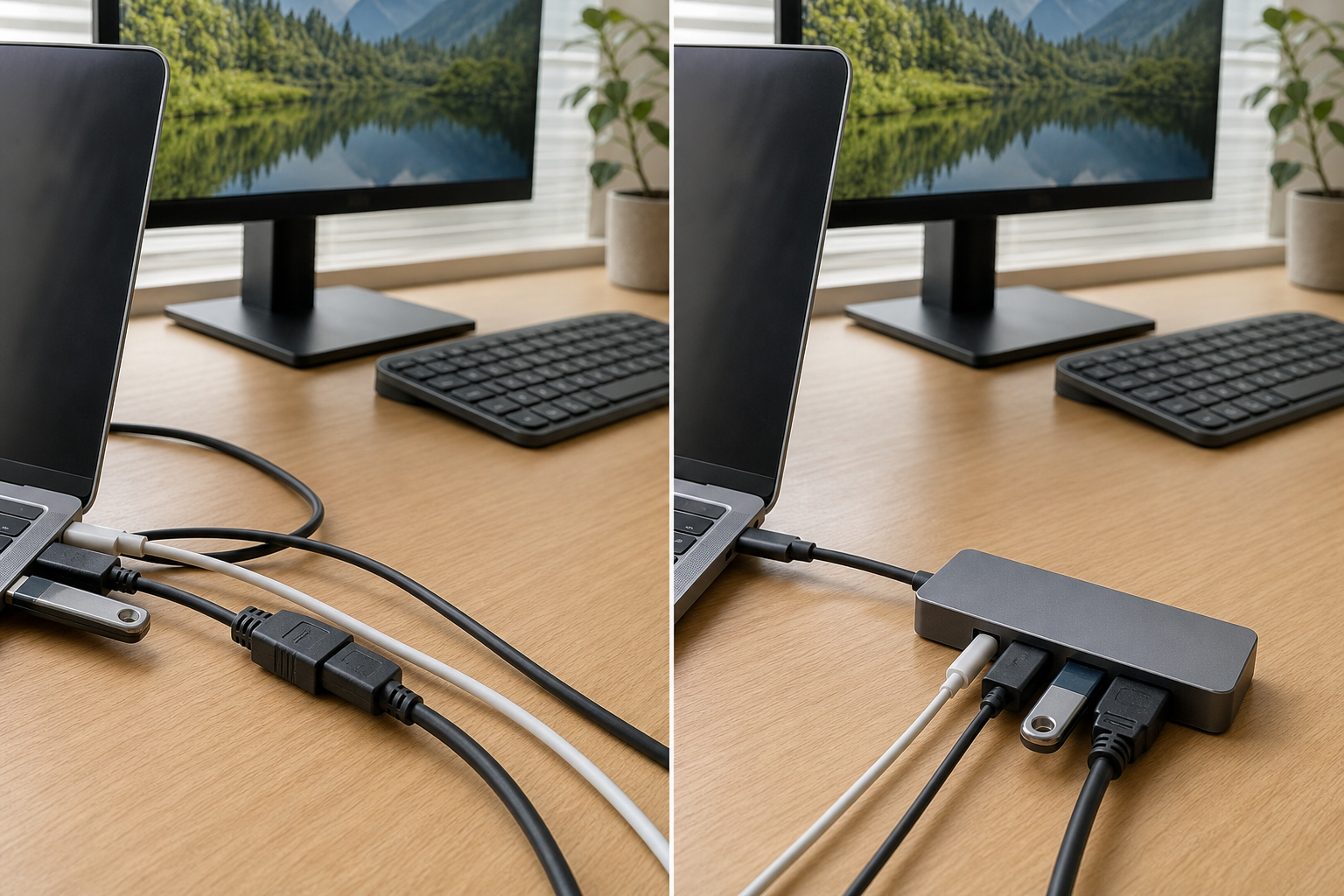
5-in-1 USB-C hub
Before introduction
Every time you take your laptop out, disconnect the screen wires, peripherals, and power supply separately. When putting it back in, check the position of the insertion port and reinsert it again.
After introduction
The screen and peripheral devices are consolidated on the hub side. This reduces reconnection steps when taking the laptop away and makes it easy to return everything to its usual place.
Biggest benefit:It can shorten the daily putting on and taking off procedure. Especially for people who shuttle their laptops back and forth between home and outside, the ``labor'' will be reduced before the time is taken up.
- Consolidates data transfer, peripherals, screen, and power supply into one unit
- Check the usage of the external screen as there are requirements for displaying high-quality images.
- A separately sold charger and cable are required to send power to the PC while connected.
Conditions not suitable:It will not work unless the outlet on the PC side supports screen output and power transmission. If you need a wired network, a recording card, or high image quality and smooth display, then another type is suitable.
Check on Amazon →Compare with a connection hub for the same purpose
| candidate | things that can be put together | Price/guarantee (date of acquisition) | Conditions to choose |
|---|---|---|---|
| Anker 332 USB-C Hub (5-in-1) →Amazon.com result: $18.99 USDChecked August 13, 2026. Price and availability can change. Confirm price and availability on Amazon.com before buying. | 1 screen, 3 peripherals, and power to the computer | $18.99 USD Amazon.com result checked August 13, 2026 | I want to use one for my daily basic insertion and removal.No wired internet or recording card required |
| UGREEN Revodok 105 USB-C Hub →Amazon.com result: $15.98 USDChecked August 13, 2026. Price and availability can change. Confirm price and availability on Amazon.com before buying. | Same 5 terminal class. The arrangement of terminals and the length of the main cable are different. | $15.98 USD Amazon.com result checked August 13, 2026 | $15.98 USD Amazon.com result checked August 13, 2026 |
| UGREEN Revodok Pro 7-in-1 USB-C Hub →Amazon.com result: $27.35 USDChecked August 13, 2026. Price and availability can change. Confirm price and availability on Amazon.com before buying. | In addition to the basic terminal, SD/microSD card. Also compatible with 4K/60Hz HDMI | $27.35 USD Amazon.com result checked August 13, 2026 | $27.35 USD Amazon.com result checked August 13, 2026 |
Conclusion:Anker 332 is sufficient if you just want to combine the screen, peripherals, and power supply. If the length and location of the main cable do not suit you, and you prioritize price and warranty, choose UGREEN Revodok 105. I only upgrade to the Anker Nano 7-in-1 if I need an SD card or 4K/60Hz on a weekly basis. If you need a wired LAN, choose a LAN-equipped model instead of these three options.
Comparison confirmation/price/warranty:Anker 332 official、UGREEN Revodok 105 official、UGREEN Warranty Policy、Anker Nano 7-in-1 official. Please double check the price, stock, accessories, and warranty conditions on the sales page at the time of purchase.
04|Shopping to organize your work surface
monitor arm
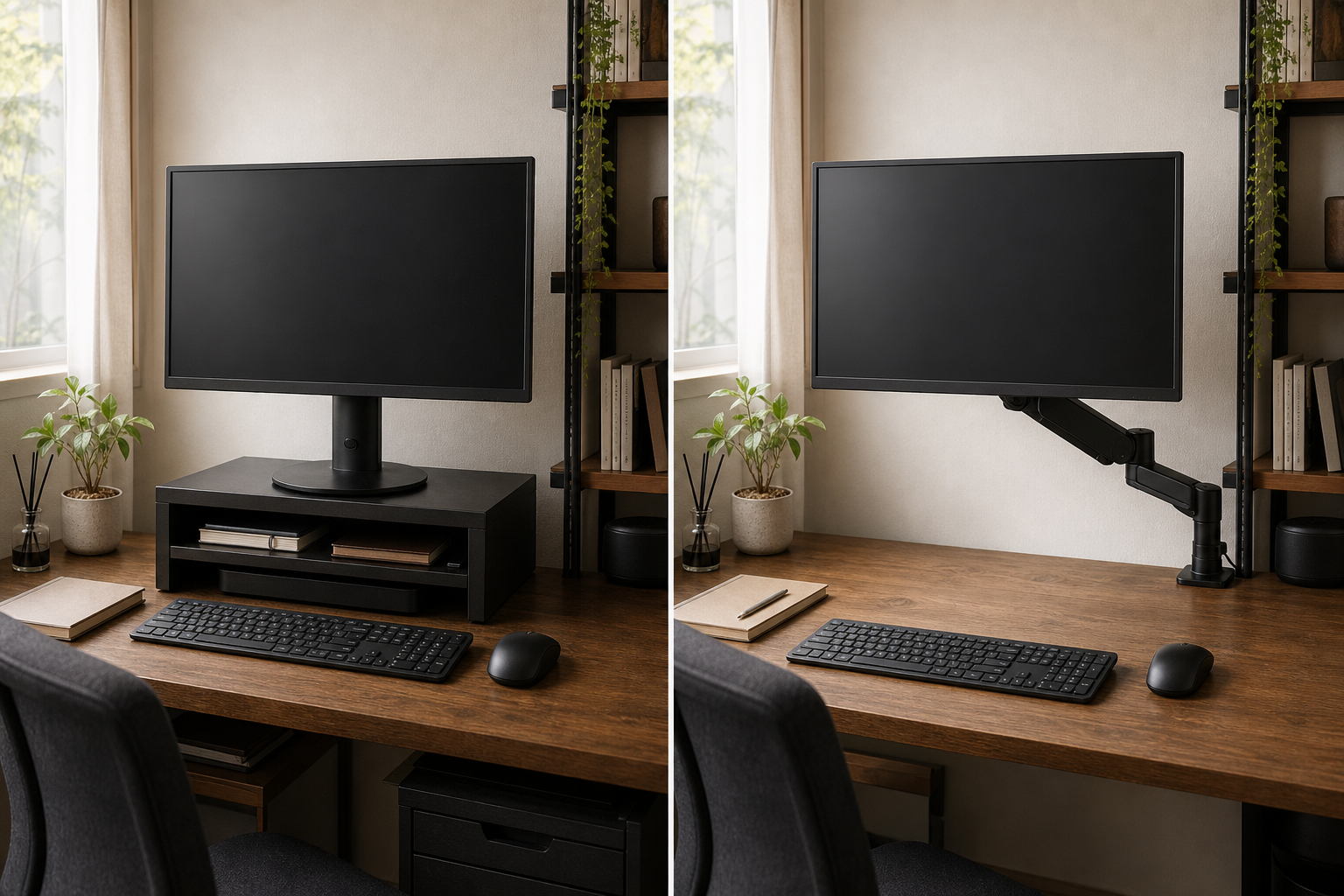
desk monitor arm
Before introduction
The legs and depth of the monitor stand take up space on the desk, and there isn't enough space to spread out notes and materials. The screen position is also fixed to the height of the stand.
After introduction
There is free space under the monitor, allowing you to move the keyboard and materials to the back. The height, depth, and angle can be easily adjusted for each posture and task.
Biggest benefit:You can simultaneously increase the area available for work and the freedom of screen placement without having to buy a new desk.
- Check that the weight of the screen matches the distance between the mounting holes on the back.
- Measure the thickness, depth, and position of the top plate where it can be fixed to the desk.
- People who frequently change the screen position can take advantage of ease of movement.
Conditions not suitable:The cost and installation burden are the largest among the six products. Thin tops, glass tops, and desks with no room to secure on the back will require reinforcement or other securing methods.
Check on Amazon →Compare with monitor arm for the same purpose
| candidate | Characteristics/corresponding weight | Price (date of acquisition) | Conditions to choose |
|---|---|---|---|
| Amazon Basics Single Monitor Arm →Amazon.com result: $28.99 USDChecked August 13, 2026. Price and availability can change. Confirm price and availability on Amazon.com before buying. | Gas spring type. Maximum 7kg, VESA 75×75/100×100mm | $28.99 USD Amazon.com result checked August 13, 2026 | Once you decide on the screen position, do not move it much.If it is less than 7kg, you can achieve the basic purpose of freeing up desk space at the lowest price. |
| VIVO Single Monitor Desk Mount →Amazon.com result: $34.99 USDChecked August 13, 2026. Price and availability can change. Confirm price and availability on Amazon.com before buying. | Gas spring type. 2-8kg. Two methods: clamp and grommet | $34.99 USD Amazon.com result checked August 13, 2026 | $34.99 USD Amazon.com result checked August 13, 2026 |
| Ergotron LX Monitor Arm →Amazon.com result: $199.00 USDChecked August 13, 2026. Price and availability can change. Confirm price and availability on Amazon.com before buying. | 3.2 to 11.3 kg, up to 34 inches. Easy to move the screen back and forth and up and down frequently | $199.00 USD Amazon.com result checked August 13, 2026 | $199.00 USD Amazon.com result checked August 13, 2026 |
Conclusion:If you just want to use a screen weighing less than 7 kg in a fixed position and free up space on your desk, choose AmazonBasics DS-MADSBE. Sanwa CR-LAC1405BK for weights up to 8kg or grommet fixation. If the screen changes positions frequently or weighs more than 8 kg, upgrade to LX 45-241-224. Items that do not match the weight of the screen, VESA hole, or top plate conditions will be excluded regardless of price.
Comparison confirmation:Ergotron LX official、Amazon handling price list、Amazon Basics Single Monitor Arm →Amazon.com result: $28.99 USDChecked August 13, 2026. Price and availability can change. Confirm price and availability on Amazon.com before buying.、Sanwa direct sales page、Sanwa official specifications. Price and stock are subject to change. Please check the weight of the screen, mounting holes, and top board conditions immediately before purchasing.
05|Shopping to organize your laptop location
laptop stand
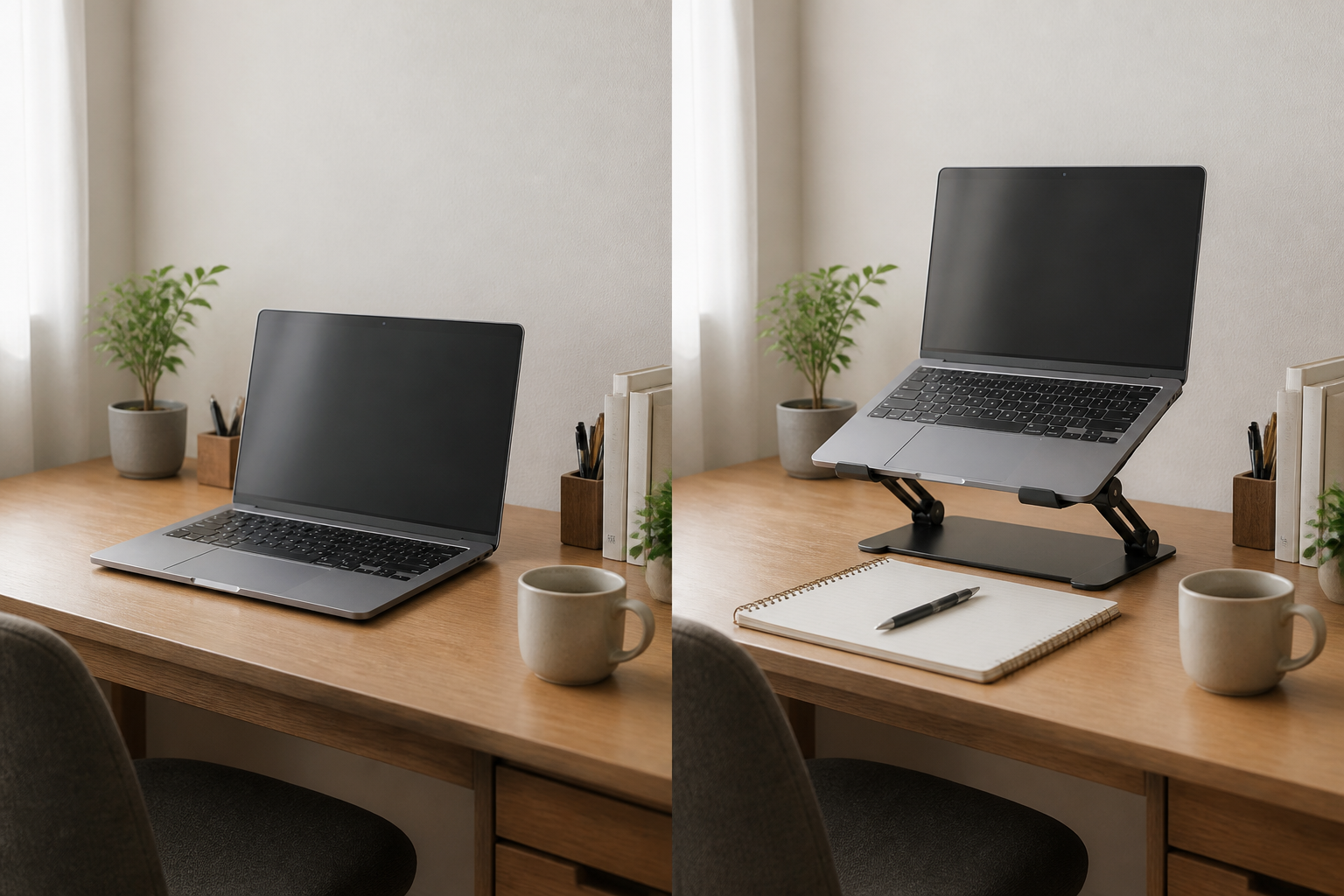
Choose based on usage and height
Before introduction
The notebook PC itself occupies the center of the desk, leaving no place in front for documents or notes.
After introduction
You can lift the main unit and adjust the screen position to create a usable area in front of and below the PC.
Biggest benefit:You can restore your work surface by simply changing the way you place your laptop, without having to buy a new desk.
- Check if the screen size and weight of your laptop are within the compatible range.
- Decide whether to use the internal keyboard or an external keyboard
- Check the stability and weight, as the higher the height, the easier it is to shake.
Conditions not suitable:If you use the main keyboard for a long time, lifting it up high will make your arms tired. If you don't have a place to put an external keyboard, just keep it at a low angle.
3 candidates for laptop stands with the same purpose
| candidate | Structure/Application | Price/acquisition date | Conditions to choose |
|---|---|---|---|
| Nulaxy C3 Laptop Stand →Amazon.com result: $15.29 USDChecked August 13, 2026. Price and availability can change. Confirm price and availability on Amazon.com before buying. | Made of steel, stepless height and angle adjustment, load capacity 3kg | $15.29 USD Amazon.com result checked August 13, 2026 | I want to raise the screen inexpensively using an external keyboard |
| SOUNDANCE Laptop Stand →Amazon.com result: $17.99 USDChecked August 13, 2026. Price and availability can change. Confirm price and availability on Amazon.com before buying. | Approximately 1.2 kg made of steel, 2 hinges, load capacity 3 kg | $17.99 USD Amazon.com result checked August 13, 2026 | I want to keep the size up to 15.6 inches and prioritize stability. |
| Rain Design mStand →Amazon.com result: $39.90 USDChecked August 13, 2026. Price and availability can change. Confirm price and availability on Amazon.com before buying. | Made of aluminum, foldable, height and angle adjustable. Approximately 950g | $39.90 USD Amazon.com result checked August 13, 2026 | I want to prioritize metal texture and folding structure. |
Conclusion:200-STN077 if it is stationary and fulfills the basic purpose. We will only increase the price if you have a clear need for stability or aluminum construction.
Specifications/price confirmation:200-STN077 official、PDA-STN78S official、CR-38 official(Verified August 8, 2026). Please double check the price and availability at the time of purchase.
06
Compare with products for the same purpose
If you place products that serve the same role next to each other, you can see the difference between "candidates that meet the basic purpose at a low price" and "candidates who will pay for additional functions". Prices and availability vary, so please check the compatibility terms on the sales page before purchasing.
| Place you want to organize | Emphasis on cost performance | Emphasis on functionality and responsiveness | selection |
|---|---|---|---|
| wiring | BUFFALO BSTB01SBK | Yamazaki Jitsugyo Web L 2707 | BUFFALO for 4 taps. Large item only when storing 7-piece class |
| at hand | Pebble Mouse 2 M350s | MX Anywhere 3S | Pebble for thinness and price. If you need to switch between multiple devices or operate on a glass surface, use MX. |
| connection | UGREEN Revodok 105 | Anker Nano 7-in-1 | UGREEN for basic 5 terminals. 7-in-1 only when using SD card and 4K/60Hz |
| work surface | Amazon Basic DS-MADSBE | Ergotron LX 45-241-224 | If you want to use 7kg or less in a fixed position, use Amazon Basics. LX if you move frequently or exceed 8kg |
| PC position | 200-STN077 | CR-38 | For basic height adjustment, use steel. CR-38 only if aluminum and folding are your priority |
07|Check the comparison results
Check prices and installation conditions side by side
Check the list of price differences, additional features, required installation dimensions, and unsuitable conditions for each category: wiring, hand, connection, work surface, and laptop position.
The purpose is to organize the area around the computer desk.
We compared prices, specifications, and installation conditions for cable boxes, wireless mice, connection hubs, monitor arms, and notebook PC stands by category.